Mastering the Colorful California Night Text Effect: A Guide to Modern Graphic Design Assets
In the vibrant world of digital design, typography is no longer just about legibility; it is about emotion, atmosphere, and visual storytelling. One of the most captivating trends to emerge in recent years is the Colorful California Night Text Effect. This style captures the essence of neon-lit boulevards, sunset gradients, and the electric energy of urban nightlife. For designers, marketers, and content creators, understanding how to utilize this aesthetic can significantly elevate the impact of their visual communications.
However, creating such complex effects from scratch in software like Adobe Illustrator can be time-consuming and technically demanding. This is where pre-made design assets, specifically those offering 100 editable words, fonts, sizes, and effects, become invaluable tools. This article explores the significance of these text effect designs, clarifies common misconceptions about font files versus effect files, and demonstrates how easy-to-edit EPS resources can streamline your creative workflow.
Understanding the Aesthetic: Why "California Night"?
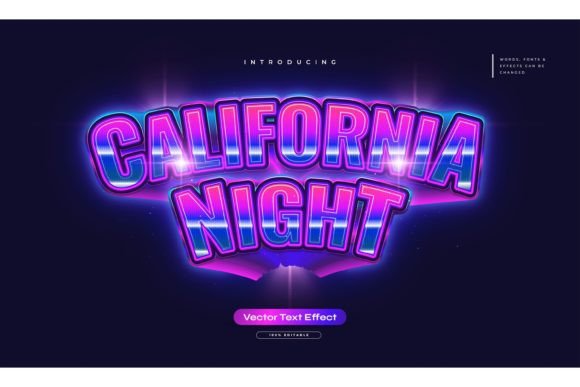
The term "California Night" evokes a specific sensory experience. It brings to mind the glowing signage of Los Angeles, the palm trees silhouetted against a twilight sky, and the retro-futuristic vibe of synth-wave culture. When applied to typography, this aesthetic typically involves:
- Vibrant Gradients: Smooth transitions between purples, pinks, oranges, and deep blues.
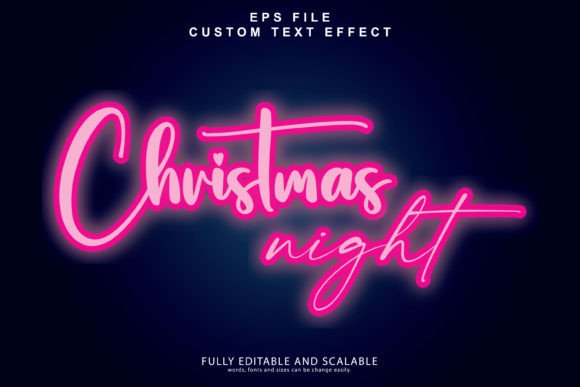
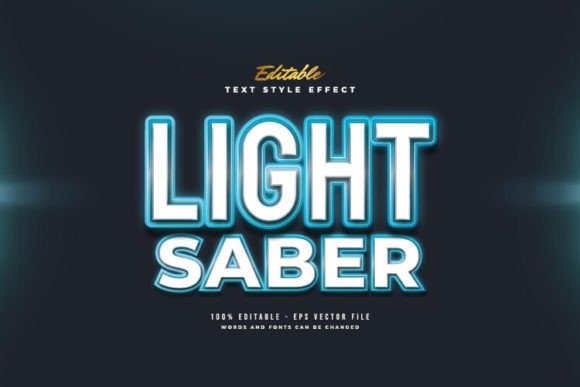
- Glow Effects: Outer glows that mimic neon tubing or streetlights reflecting off wet pavement.
- High Contrast: Bright text set against dark backgrounds to maximize visibility and drama.
This style is not merely decorative; it serves a functional purpose in modern marketing. In an era where social media feeds are saturated with content, visuals that pop with color and light are more likely to capture attention. Whether used for YouTube thumbnails, Instagram stories, or event posters, the California Night effect creates an immediate sense of energy and excitement.
Clarifying the Product: Text Effect vs. Font File
One of the most common misunderstandings among beginner designers is the difference between a font and a text effect. It is crucial to clarify this distinction before purchasing or downloading design assets.
A font is a typeface file (such as .OTF or .TTF) that installs on your computer and allows you to type characters in a specific style. A text effect, however, is a pre-designed graphic style applied to text. The product described here—Colorful California Night Text Effect—is not a font. Instead, it is a collection of vector styles created in Adobe Illustrator.
Why does this matter? Because it offers greater flexibility. Since this is a design effect and not a rigid font file, you are not limited to a single typeface. You can change or use any font you like. Whether you prefer a bold sans-serif for a modern look or a script font for elegance, the underlying effect—gradients, shadows, and glows—can be applied to any typography choice. This versatility makes the asset far more useful than a standard font download.
The Power of Editability: 100 Words and Beyond
Efficiency is key in professional design. Creating complex gradient meshes and glow effects manually for every project can take hours. High-quality design packs address this by providing 100 editable words and phrases. These often include common marketing terms, motivational quotes, or trendy slogans that are ready to use out of the box.
How Easy Editing Works
The primary selling point of these Adobe Illustrator text style effects is their user-friendly nature. The promise of "Easy to Edit Just Click and Change The Texts" is not just marketing hype; it reflects the power of vector graphics.
- Open the File: Load the included EPS file into Adobe Illustrator.
- Select the Text: Click on any of the pre-made words.
- Type Your Content: Simply delete the placeholder text and type your own.
- Automatic Application: The gradient, stroke, and glow effects automatically adjust to fit the new characters.
This workflow allows designers to produce high-quality, professional-grade typography in seconds rather than hours. It democratizes advanced design techniques, allowing beginners to achieve results that previously required expert knowledge of blending modes and appearance panels.
Technical Specifications: EPS and JPG Previews
When evaluating design assets, file format is critical. This package includes two essential formats: EPS and JPG.
EPS (Encapsulated PostScript): This is the core working file. EPS is a vector format, meaning it uses mathematical paths rather than pixels. The significant advantage of vector files is scalability. You can resize the text effect from the size of a business card to a billboard without any loss of quality. There will be no pixelation or blurriness, ensuring your design looks crisp on any medium.
JPG Preview: The included JPG files serve as visual references. They allow you to quickly browse the 100 included styles without opening heavy vector files. This is particularly useful for mood boarding or showing clients options before finalizing a design direction.
Practical Applications in Modern Life and Business
The utility of the Colorful California Night Text Effect extends beyond pure aesthetics. It has practical relevance across various industries and daily activities.
Digital Marketing and Social Media
In digital marketing, engagement is driven by visual appeal. Posts featuring neon-style text often see higher click-through rates because they stand out against white or neutral backgrounds. Influencers and brands can use these editable effects to create consistent, eye-catching headers for videos, stories, and feed posts.
Event Promotion and Nightlife
Naturally, this aesthetic fits perfectly with the entertainment industry. Clubs, music festivals, and concert promoters can use these text effects to create flyers and digital ads that convey the energy of the event. The ability to quickly swap out artist names or dates while maintaining a cohesive visual style is a massive advantage for fast-paced promotional cycles.
Educational and Creative Projects
For students and educators, these assets provide a learning tool. By deconstructing the layers in the EPS file, learners can understand how professional designers build complex effects. It serves as a practical example of layer management, gradient application, and typography hierarchy.
Best Practices for Using Text Effects
To get the most out of these design assets, consider the following best practices:
- Contrast is Key: Ensure your background is dark enough to let the neon colors pop. Light backgrounds may wash out the glow effects.
- Font Selection Matters: While you can use any font, bold and thick typefaces generally hold gradient effects better than thin, delicate scripts.
- Brand Consistency: Adjust the gradient colors to match your brand palette if necessary. The editable nature of the file allows for custom color tweaks.
- Export Correctly: For web use, export as PNG or JPG. For print, ensure you are using the vector EPS file to maintain resolution.
Conclusion
The Colorful California Night Text Effect represents more than just a trend; it is a powerful tool for visual communication. By leveraging pre-made, editable Adobe Illustrator assets, designers of all skill levels can save time while producing stunning, professional-quality work. Understanding that this is a flexible text effect design—not a restrictive font file—opens up endless creative possibilities. Whether you are promoting a business, creating social media content, or exploring digital art, these easy-to-edit EPS files provide the perfect blend of style, convenience, and versatility.
Embrace the glow, experiment with different fonts, and let the vibrant energy of the California night illuminate your next design project.